

Description
Simple BMI Calculator for Health Tracking
Overview
The software is designed as a straightforward tool for calculating body mass index (BMI), offering support for both metric and imperial measurement systems. It enables users to assess their weight status relative to height, which is commonly used in health and fitness evaluations. The application is intended for individuals seeking a quick, accurate way to monitor their BMI without relying on external websites or complex health platforms.
Target users include health-conscious individuals, fitness enthusiasts, and anyone interested in tracking personal wellness metrics. It is particularly useful for those who prefer offline tools or want to avoid data sharing with third-party services. The software may be used in personal health routines, school projects, or as a basic reference in wellness programs.
As the developer did not provide additional background information, the origin and development history of the application remain unspecified. No third-party integrations or data collection mechanisms were mentioned in the provided details.
Key Features & Capabilities
- BMI Calculation – Computes BMI using either metric (kg/m²) or imperial (lb/in²) units based on user input.
- Multi-System Support – Allows switching between metric and imperial systems to accommodate global users.
- Simple Input Interface – Requires only height and weight entries for immediate results.
- Offline Functionality – Operates without internet access, ensuring privacy and consistent performance.
- Lightweight Design – The application has a minimal footprint of 10 MB, making it suitable for low-resource devices.
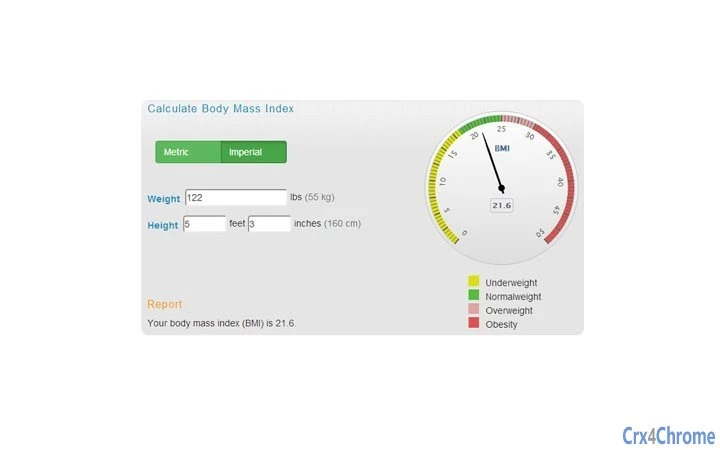
Users can enter their height and weight in their preferred unit system and receive an instant BMI result. The output is displayed clearly, with no additional data or charts. This makes the tool ideal for quick assessments during fitness planning, medical check-ups, or personal health tracking. It does not include advanced features such as body fat percentage estimation or health recommendations.
User Interface, Workflow & Performance
The user interface is minimalistic, focusing on core functionality. The layout includes input fields for height and weight, a unit selector, and a result display area. Navigation is straightforward, with no menus or settings beyond the basic configuration. The workflow is linear: enter data → select system → view result.
Given the application’s simplicity and small size, it is expected to load quickly and respond instantly to user input. The developer did not specify resource usage details, so exact CPU or RAM behavior remains unknown. However, based on general software behavior patterns, the tool is likely to use minimal system resources.
Stability appears to be a priority, as the software operates without requiring external dependencies or background services. No crash reports or error logs were provided, but the absence of complex features suggests a low risk of instability. Performance observations are based on general software behavior patterns.
Compatibility & System Requirements
The software is compatible with Windows, Mac, and Linux operating systems, making it a cross-platform solution. It is available in version 1.0, with an installation size of 10 MB. This small footprint suggests it is optimized for systems with limited storage or older hardware.
Exact system requirements were not listed. The developer did not provide information on minimum CPU, RAM, or disk space needs. Platform compatibility information is limited to the supported operating systems, and no specific hardware dependencies were mentioned.
Pros and Cons
Pros
- Free to use with no hidden costs
- Supports both metric and imperial measurement systems
- Lightweight at just 10 MB
- Works offline, enhancing privacy
- Available for Windows, Mac, and Linux
Cons
- No advanced health metrics or recommendations
- Minimal interface with no customization options
- Exact system requirements not specified
- Limited to BMI calculation only
- No integration with health trackers or apps
FAQ Section
Is the software available for all major operating systems?
Yes, the software is compatible with Windows, Mac, and Linux, allowing broad accessibility across different platforms.
Is the tool safe to use offline?
Yes, the application operates entirely offline, meaning no data is transmitted to external servers, which enhances user privacy and security.
Does the software require an internet connection?
No, the tool does not require an internet connection to function, making it suitable for use in environments with limited or no connectivity.
What types of BMI calculations are supported?
The software supports both metric (kilograms and meters) and imperial (pounds and inches) systems for accurate BMI computation.
Is the software free to download and use?
Yes, the software is free to download and use with no licensing fees or subscription requirements.
Final Thoughts + CTA
This lightweight BMI calculator delivers a focused, reliable solution for users who need a simple, private way to assess their body mass index. With cross-platform support and no need for internet access, it stands out as a secure and efficient tool for personal health tracking. While it lacks advanced features, its simplicity and accessibility make it ideal for everyday use by health-conscious individuals and fitness beginners.
Download Simple BMI Calculator for Health Tracking now.
Guides & Tutorials for BMI Calculator App for Chrome
How to install BMI Calculator App for Chrome
- Click the Preview / Download button above.
- Once redirected, accept the terms and click Install.
- Wait for the BMI Calculator App for Chrome download to finish on your device.
How to use BMI Calculator App for Chrome
This software is primarily used for its core features described above. Open the app after installation to explore its capabilities.
User Reviews for BMI Calculator App for Chrome 0
No reviews found





